
Coinvest NSFAS Registration
Coinvest NSFAS is a platform that simplifies the process of securing financial aid in today’s rapidly changing digital age. The Coinvest NSFAS guide offers essential support for both students seeking financial aid and administrators who manage these funds by providing step-by-step instructions on registering, logging in, and withdrawing funds. For students, it also provides crucial information about allowance of NSFAS, helping them understand what financial support they are eligible to receive. In order to pursue higher education, financial assistance is often required, and Coinvest NSFAS facilitates this process.
Why Choose Coinvest NSFAS?
- User-Friendly Interface: In addition to simplifying application and disbursement processes, Coinvest NSFAS provides a user-friendly platform.
- Timely Disbursements: We ensure that funds are disbursed promptly in order to ensure that students receive the financial assistance they require at the time they need it.
- Security: In order to protect user data and financial transactions, Coinvest NSFAS employs robust security measures.
ONBOARDING PROCESS
Access the Signup Link {nsfas.coinvest.africa} > Enter ID Number > Enter Mobile Number > Enter OTP > Create Username > Create Password > Select Identification > Upload Documents > Upload File > Lastly, enter first name, surname, and ID number.
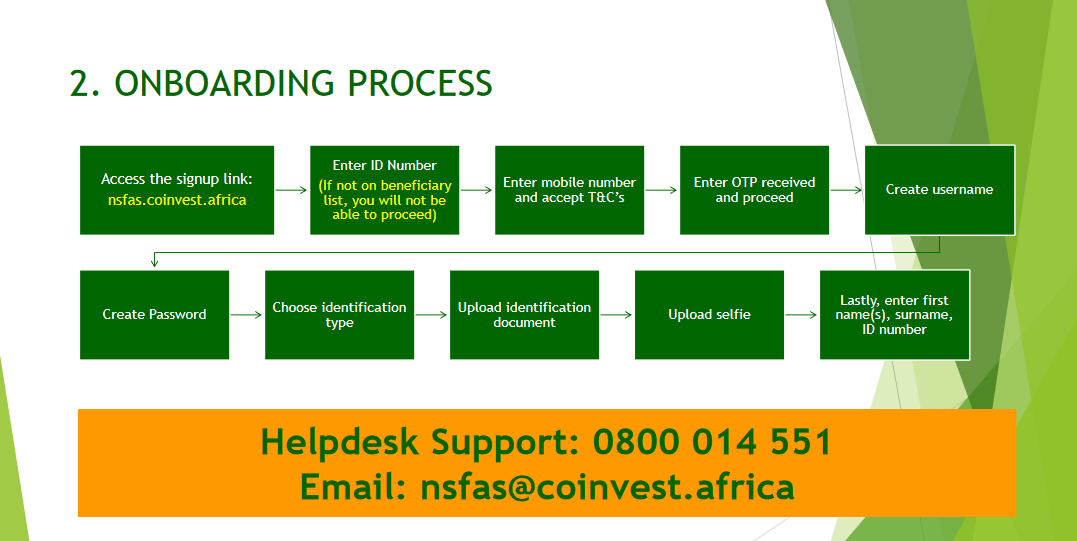
Coinvest NSFAS Account Method: Step-by-Step Guide
In order to set up your Coinvest NSFAS Bank account successfully, please follow the detailed steps outlined below. As a result, you will be able to manage and receive your NSFAS funds efficiently.
STEP 1: Enter ID Number
- {(If not on the beneficiary list, you will not be able to proceed}.
- Click the “Next” button to proceed.

STEP 2: Enter your mobile number and accept T&Cs.
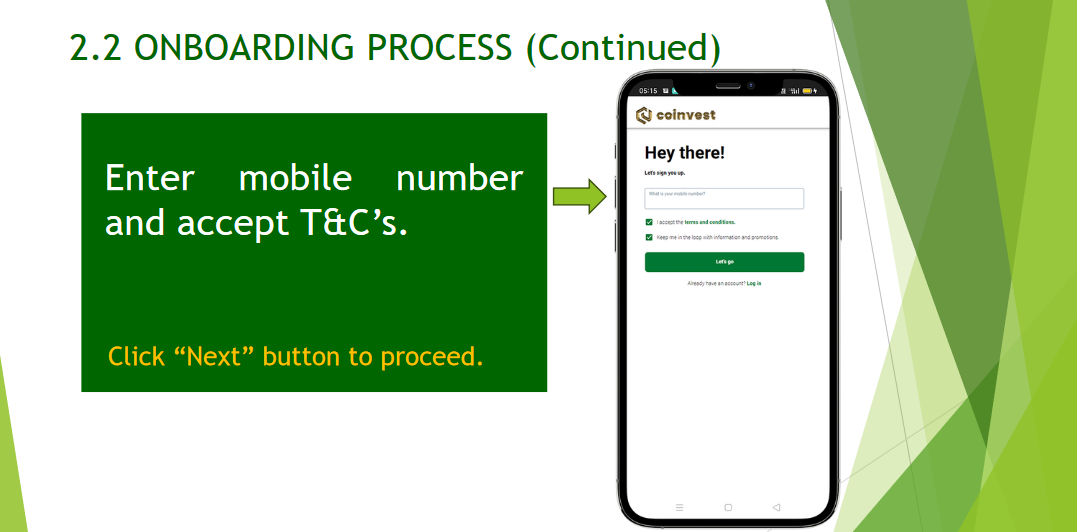
STEP 3: Enter the OTP received and proceed.

STEP 4: Create a username.
- (It is recommended that you use your ID Number for ease of remembering and uniqueness.)

STEP 5: Create a password.
- (It is recommended that you create a strong password.)

STEP 6: Select the Type of Identification.
- Green barcode ID
- Card ID

STEP 7: Upload the Type of Identification selected.

STEP 8: Take a Selfie of yourself as illustrated.

STEP 9: Enter your details.

STEP 10: Congratulations!!!.
- Your account is ready

STEP 11: Collect your card at the nearest campus from the Coinvest Agent.

Completion
- Confirmation of Successful Registration: You will be able to complete your registration once you have completed all the steps.
- With this digital bank account, you will be able to receive funds directly from NSFAS.
This setup process is designed to be user-friendly and secure, ensuring that students needing financial support can access their funds with ease. Whether you’re a new user setting up your Coinvest NSFAS account for the first time or a returning user needing to access your funds.
Coinvest NSFAS Account for Existing Users
When you are a registered user of the Coinvest NSFAS platform, accessing your account is a simple process. Log in and manage your NSFAS funds efficiently by following these steps.
Step-by-Step Process:
Access the Coinvest NSFAS Website:
- Go to the Coinvest NSFAS website using your web browser.
- You can do this by entering the URL directly into your browser’s address bar.
Initiate the Entering Process:
- On the homepage of the Coinvest NSFAS website, look for the “Log In” button, which is typically located at the top right corner of the page.
Enter Your Credentials:
- Once you click “Log In,” you will be directed to the login page.
- Here, you need to enter your registered email address and password.
- Ensure that you enter the details correctly to avoid access issues.
Complete the EntranceProcess:
- After entering your credentials, click the “Login” button to access your account.
- If your details are correct, you should be redirected to your dashboard, where you can manage your NSFAS funds.
If You Have Forgotten Your Password:
Password Reset Option:
- In case you forget your password, don’t worry.
- The Coinvest NSFAS login page provides an option to reset your password.
- Simply click on the “forgot password” link, usually found below the password entry field.
- Follow the prompts to reset your password, which typically involves verifying your identity and setting a new password through a secure process.
Navigating Your Coinvest NSFAS Dashboard
You will be greeted by your dashboard after logging in. Among the features you can access here are:
- Application Status: Check the progress of your application on your login to NSFAS.
- Disbursement History: View your past disbursements.
- Profile Settings: Update your personal information.
- Withdraw Funds: Initiate fund withdrawals.
Applying for Financial Aid
Coinvest NSFAS offers financial aid through the following steps:
- You need to log in to your account.
- You can apply for financial aid by clicking on “Apply for Financial Aid.”
- Provide accurate information on the application form.
- Please submit your application.
- You will receive a notification regarding the status of your application.
How to Withdraw Funds from Your Coinvest NSFAS Account
Withdrawing funds from your Coinvest NSFAS account is streamlined through multiple convenient methods, ensuring that you have easy access to your financial aid whenever needed. Here’s a detailed guide on the various withdrawal methods, along with some tips and the associated benefits and charges.
Methods for Withdrawing Funds from Coinvest NSFAS
ATM Withdrawals:
- Process: Use your Coinvest money card to withdraw cash at any ATM displaying the Mastercard logo.
- Convenience: This allows you instant access to cash whenever you need it.
Point of Sale (POS) Terminal:
- Process: Utilize your Coinvest money card for purchases at any POS terminal that accepts Mastercard.
- Practicality: Pay for goods and services directly using the funds in your NSFAS account without needing cash.
Through the Coinvest App:
- Process: Transfer funds directly from your Coinvest NSFAS account to your bank account or to another Coinvest account using the mobile app.
- Flexibility: Manage your transfers and payments digitally, offering a seamless way to handle your finances.
Tips for Successful Withdrawals
- Check Fund Availability: Ensure your account has enough funds to cover the withdrawal and any associated fees.
- Be Aware of Limits: The minimum withdrawal amount is R10, and the maximum daily withdrawal limit is R5,000.
- Location Restrictions: You can only make ATM withdrawals within South Africa, adhering to local financial regulations.
Fees Associated with Coinvest NSFAS Withdrawals
- Deposit Fee: When you receive your NSFAS allowance from Coinvest, a payment fee of R12 will be charged.
- Immediate Payment Fee: There is a fee of R35 for urgent transfers from your Coinvest account to your bank account.
- Standard Payment Fee: Regular payments are charged at a lower rate of R5.
Benefits of Using Coinvest NSFAS
- Convenience: You will not need to wait in line or complete extensive paperwork in order to access your funds.
- Speed: You will receive your funds within a short period of time if the processing time is quick.
- Security: Advanced security measures ensure your financial information and funds are secure.
- User-Friendly Interface: Even non-technical users will find the platform easy to use.
- 24/7 Accessibility: Manage and access your funds at any time, suitable for students with varying schedules.
It is possible to effectively manage NSFAS funds through Coinvest with the assistance of these methods and tips, ensuring students have the financial support they need to continue their education. In addition to the flexibility and security offered by ATMs, point of sale terminals, and the Coinvest app, it is a preferred choice for managing the finances of educational institutions.
Sales
- [email protected]
- +27 11 507 5555
Support
- [email protected]
- +27 11 507 5555
- 080 001 4551